
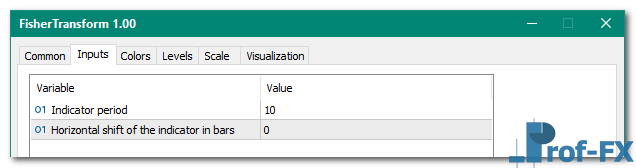
FisherTransform

FisherTransform mt5 indicator
FisherTransform mt5 indicator FisherTransform mt5 indicator

How To Install Metatrader 5 FisherTransform indicator

  1. Download and save the “FisherTransform indicator” to your desktop or any other folder located on your computer.
  2. Open your Metatrader 5 platform.
  3. Choose “File” then “Open Data Folder” (Ctrl + Shift + D) on your Metatrader 5 platform.
  4. Explore the following folder: MQL5 > Indicators.
  5. Copy and paste the “FisherTransform indicator” into this folder.
    Tip: Create subfolders inside the main MT5 Indicators folder to help keep your indicators better organized.
  6. Restart your Metatrader 5.
  7. MT5 custom indicators are stored by default in the custom indicator folder.
    To access these indicators, go to Top Menu > Insert > Indicators > Custom
  8. In order to add a custom indicator to any of your Metatrader 5 charts, you will need to select a forex chart with one mouse click, then go to Top Menu > Insert > Indicators > Custom > click the “FisherTransform” indicator.
  9. Done!

See a complete guide How To Install Metatrader 5 Custom Indicators

Free Download FisherTransform indicator for Metatrader 5

  • FisherTransform.zip
  • Size: 18.8 kb
  • Platform: MT5 | Format: .mql5/.ex5 | File: dir5mt5 | Request Remove!
Forex Advertising rectangle - headway
Forex Advertising Package
Gravatar Image
FX Script is a collective of skilled forex traders with extensive knowledge of MetaTrader indicators. Known for their expertise, they regularly contribute to Prof FX, offering practical trading tips and advanced strategies to guide traders towards success in the forex market.

Leave a Reply

Your email address will not be published. Required fields are marked *

Trading Psychology for Consistent Forex Success

Understanding Why Trading Psychology Matters More Than Any Single Trade When discussing forex trading, much has already been said about

A chartbook can make or break your trading

Keeping a chartbook of trades you have taken might seem like such a random thing to do. A nice to

How Use Stochastic Oscillator

The Stochastic oscillator, invented by George Lane measures momentum in the market and consists of two lines (%D and %K).

Have you ever closed a position only to watch the currency pair continue running another 100 pips in the same

AUDUSD How to Use Trend Line in SR Forex

In the first part of our series on trading support and resistance, we explored the significance of these levels in

Norwegian Krone Currency

The Norwegian krone (NOK) is considered to be an exotic currency in the Forex market. Since Norway is an important exporter

What is Overbought vs Oversold

Like many professional disciplines, forex trading involves a wide range of technical terminology that can be difficult for beginners to

How Stochastic Settings Reveal Market Momentum, Trend Alignment, and Entry Timing for Forex Traders Introduction — Why Forex Traders Must