
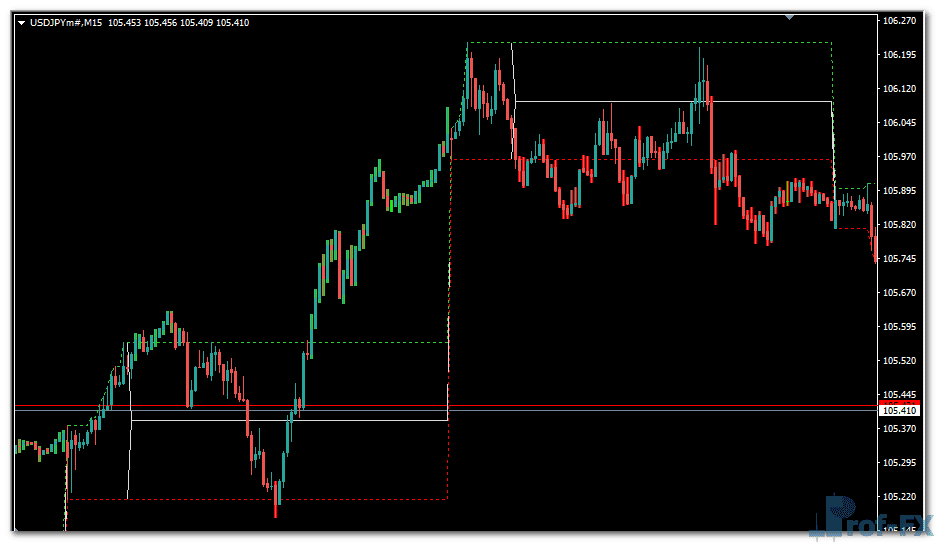
Intraday Channel Breakout

Intraday Channel Breakout metatrader 4
Intraday Channel Breakout metatrader 4 Intraday Channel Breakout metatrader 4
Intraday Channel Breakout metatrader 4

How to Instal “Intraday Channel Breakout” Indicator for Metatrader 4

  1. Open your Metatrader 4 platform.
  2. Download and save the “Intraday Channel Breakout” indicator to your desktop or any other folder located on your local computer.
  3. Choose “File” then “Open Data Folder” (Ctrl + Shift + D) on your Metatrader 4 platform.
  4. Explore the following folder: MQL4 > Indicators.
  5. Copy and paste the “Intraday Channel Breakout” indicator into this folder.
  6. Restart Metatrader 4.
  7. “Intraday Channel Breakout” indicators are stored by default in the custom indicator folder.
  8. To access these indicators, go to Top Menu > Insert > Indicators > Custom.
  9. In order to add a “Intraday Channel Breakout” indicator to any of your Metatrader 4 charts, you will need to select a forex chart with one mouse click, then go to Top Menu > Insert > Indicators > Custom > click the “Intraday Channel Breakout”.
  10. Done!

See a complete guide How To Install Metatrader 4 Custom Indicators

Free Download Intraday Channel Breakout indicator for Metatrader 4

  • Intraday Channel Breakout.zip
  • Size: 20.2 kb
  • Platform: MT4 | Format: .mql4/.ex4 | File: dir8mt4 | Request Remove!
Forex Advertising rectangle - headway
Forex Advertising Package
Gravatar Image
FX Script is a collective of skilled forex traders with extensive knowledge of MetaTrader indicators. Known for their expertise, they regularly contribute to Prof FX, offering practical trading tips and advanced strategies to guide traders towards success in the forex market.

Leave a Reply

Your email address will not be published. Required fields are marked *

Pivot Point Trading Strategy for Forex Traders

Trading without clearly defined support and resistance levels is much like driving a car without a seatbelt. The risk is

Have you ever closed a position only to watch the currency pair continue running another 100 pips in the same

How Use William’s Alligator

In the previous articles, we have covered Moving averages and Trend lines. The ‘Alligator’ Indicator covered in this blog is a mix

The Hong Kong Dollar

The Hong Kong dollar (HKD) is considered to be an exotic currency in the Forex market. The most important thing

How to Trade the Bearish Harami Candlestick Pattern

The Bearish Harami is a well-known candlestick reversal pattern that often appears near the top of an uptrend, signaling a

Stochastic Oscillator Explained for Forex Traders

The Stochastic Oscillator is one of the most widely used momentum indicators in technical analysis, particularly among forex traders seeking

Use Bollinger Band Forex

Bollinger bands are one of the most prominent indicators implemented by traders today. In this blog, we will first understand

RSI Indicator oversold overbought

Users who have been following my weekly outlook for a while, know that I often talk about RSI divergence. It