
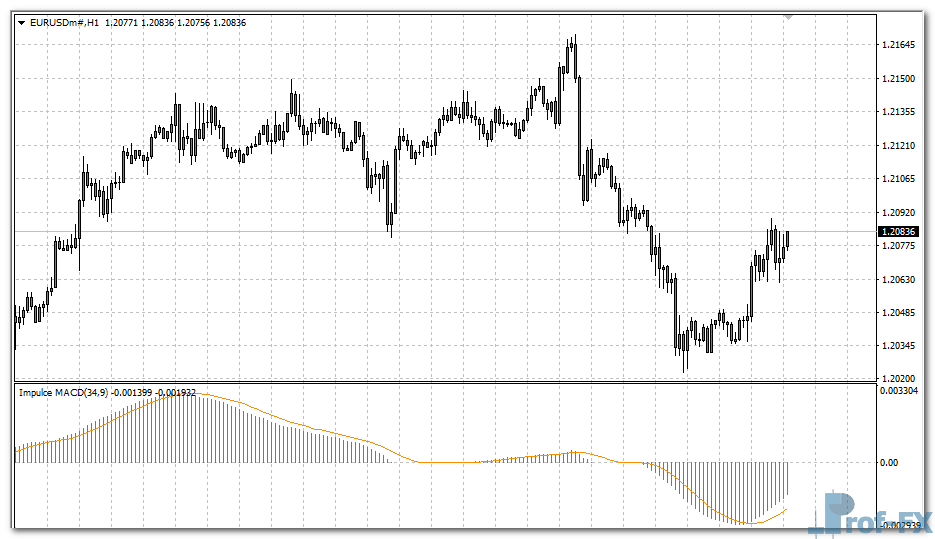
Impulse MACD

Impulse MACD mt4 indicator
Impulse MACD mt4 indicator Impulse MACD mt4 indicator

How to Instal “Impulse MACD” Indicator for Metatrader 4

  1. Open your Metatrader 4 platform.
  2. Download and save the “Impulse MACD” indicator to your desktop or any other folder located on your local computer.
  3. Choose “File” then “Open Data Folder” (Ctrl + Shift + D) on your Metatrader 4 platform.
  4. Explore the following folder: MQL4 > Indicators.
  5. Copy and paste the “Impulse MACD” indicator into this folder.
  6. Restart Metatrader 4.
  7. “Impulse MACD” indicators are stored by default in the custom indicator folder.
  8. To access these indicators, go to Top Menu > Insert > Indicators > Custom.
  9. In order to add a “Impulse MACD” indicator to any of your Metatrader 4 charts, you will need to select a forex chart with one mouse click, then go to Top Menu > Insert > Indicators > Custom > click the “Impulse MACD”.
  10. Done!

See a complete guide How To Install Metatrader 4 Custom Indicators

Free Download Impulse MACD indicator for Metatrader 4

  • impulse-macd.zip
  • Size: 19.7 kb
  • Platform: MT4 | Format: .mql4/.ex4 | File: dir7mt4 | Request Remove!
Forex Advertising rectangle - headway
Forex Advertising Package
Gravatar Image
FX Script is a collective of skilled forex traders with extensive knowledge of MetaTrader indicators. Known for their expertise, they regularly contribute to Prof FX, offering practical trading tips and advanced strategies to guide traders towards success in the forex market.

Leave a Reply

Your email address will not be published. Required fields are marked *

New Zealand Dollar Currency

The New Zealand dollar (NZD) is considered to be a major cur­rency in the Forex market. It is also one

Forex Risk Management Basics

Why Forex Risk Management Matters in Currency Trading Effective forex risk management enables currency traders to limit losses arising from

How to Build a Strong Trading Bias

Trading bias plays a critical role in helping traders make informed and structured decisions in the forex market. Whether you

Top 5 Reasons Backtesting Is The Ultimate Skill

“I’m close to going live with my system! It works perfectly!” – “Great! Have you backtested your system?” “What’s backtesting?”

How to Trade Forex Using Woodies Pivot Points

Woodies Pivot Points offer a practical and dynamic way to identify short-term support and resistance levels, making them especially popular

How to Identify When a Forex Trend Is Reversing

One of the most common – and most important – questions traders ask is how to recognize when a market

How to Use the Producer Price Index (PPI) in Forex Trading

The Producer Price Index (PPI) is a critical economic indicator that forex traders use to gauge inflation trends and predict

How Traders Can Overcome FOMO and Trade with Confidence

Understanding FOMO in Trading Psychology Fear of Missing Out—commonly known as FOMO—is one of the most destructive psychological forces in