
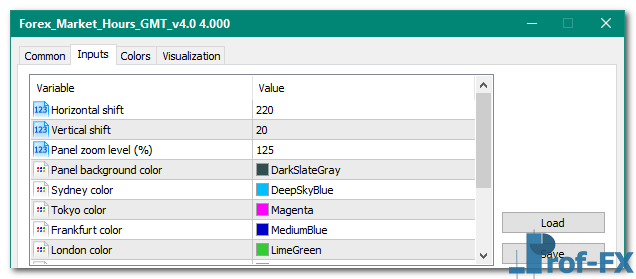
Forex Market Hours GMT v4.0

Forex Market Hours GMT v4.0 mt5 indicator
Forex Market Hours GMT v4.0 mt5 indicator Forex Market Hours GMT v4.0 mt5 indicator

How To Install Metatrader Forex Market Hours GMT v4.0 indicator

  1. Download and save the “Forex Market Hours GMT v4.0 indicator” to your desktop or any other folder located on your computer.
  2. Open your Metatrader 5 platform.
  3. Choose “File” then “Open Data Folder” (Ctrl + Shift + D) on your Metatrader 5 platform.
  4. Explore the following folder: MQL5 > Indicators.
  5. Copy and paste the “Forex Market Hours GMT v4.0 indicator” into this folder.
    Tip: Create subfolders inside the main MT5 Indicators folder to help keep your indicators better organized.
  6. Restart your Metatrader 5.
  7. MT5 custom indicators are stored by default in the custom indicator folder.
    To access these indicators, go to Top Menu > Insert > Indicators > Custom
  8. In order to add a custom indicator to any of your Metatrader 5 charts, you will need to select a forex chart with one mouse click, then go to Top Menu > Insert > Indicators > Custom > click the “Forex Market Hours GMT v4.0” indicator.
  9. Done!

See a complete guide How To Install Metatrader 5 Custom Indicators

Free Download Forex Market Hours GMT v4.0 indicator for Metatrader 5

  • Forex-Market-Hours-GMT-v4.0.zip
  • Size: 112 kb
  • Platform: MT5 | Format: .mql5/.ex5 | File: dir3mt5 | Request Remove!
Forex Advertising rectangle - headway
Forex Advertising Package
Gravatar Image
FX Script is a collective of skilled forex traders with extensive knowledge of MetaTrader indicators. Known for their expertise, they regularly contribute to Prof FX, offering practical trading tips and advanced strategies to guide traders towards success in the forex market.

Leave a Reply

Your email address will not be published. Required fields are marked *

Economical Crisis Affects Forex
by Prof Team - Jun 25 | in Forex Fundamentals

In every crisis there is very interesting events, opening the gap of social status. I really mean, the rich and

Avoid False Breakouts in Forex Trading

Breakout trading has become increasingly popular among forex traders, especially when currency pairs spend long periods consolidating within clearly defined

How to Use MACD for Earlier Trade Entries

Many forex traders appreciate the MACD indicator for its clarity and reliability, yet they often critique one specific aspect: its

Forex tick charts and why you shouldnt use them

Once you’ve been trading for a while, you might have come across forex tick charts. The tick charts are usually

Implied Volatility

Implied volatility, often abbreviated as IV and also referred to as expected volatility, represents a key variable used to estimate

Types of Forex Orders Explained

Understanding forex order types is a fundamental skill every trader must master before executing trades in the currency market. Forex

Improve Your Forex Currency Trading System

Even with a forex currency trading system, preparation is half the battle. In order to have a solid performance, you

Retail Foreign Exchange Dealers

Retail traders are speculators. This one is pretty straightforward. You are a retail trader, and let’s face it, you are