|
 |
 |
 |
What Is the Xi Asian Session Indicator
The Xi Asian Session Indicator for MT4 is a custom technical tool designed to highlight and analyze the Asian trading session directly on your MetaTrader 4 charts. This session—covering the early hours of the global forex market—is often quieter in terms of volatility compared to the London or New York sessions, but it sets the tone for what comes next.
By plotting visual boundaries for the Asian session, this indicator allows traders to identify range formations, detect potential breakout zones, and prepare for volatility shifts as the European markets open. It’s an essential visual guide for anyone who uses time-based trading strategies, such as session breakouts, scalping, or range trading.
Unlike standard MT4 tools, the Xi Asian Session Indicator automatically marks session highs and lows, calculates the price range, and provides traders with a clear map of the market’s first major movement of the day.
Whether you’re a day trader, scalper, or just beginning to learn forex step by step, this indicator can help you make sense of price movements that often appear random before the London open.
See also: xhmaster formula mt4 indicator
How It Works – Xi Asian Session Indicator
The Xi Asian Session Indicator functions by identifying the time window that corresponds to the Asian session—typically between 00:00 and 09:00 GMT (depending on your broker’s server time). Once this session period begins, the indicator tracks the highest and lowest prices during that time and draws horizontal lines to mark those boundaries.
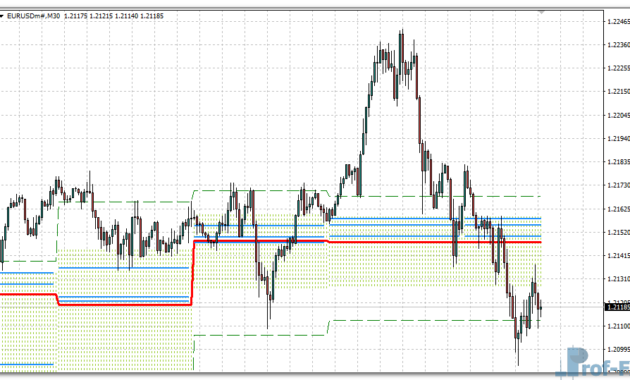
When the session closes, you are left with a price channel that shows where the market has consolidated overnight. This visual range often becomes a key reference for the next trading period, as many traders watch for breakouts above or below the Asian session range.
Here’s how traders typically use it in practice:
- Asian Session Range Identification:
The indicator automatically plots the high and low of the Asian trading session. This gives you a clear sense of where price was “contained” before major markets open. - Breakout Confirmation:
As the London session begins, traders watch for price to break above the session high or below the session low. This often signals the beginning of stronger directional moves. - False Breakout Filtering:
By observing the range width (the distance between the high and low), traders can filter out weak or false breakouts. For example, a very narrow Asian range may lead to more reliable breakout momentum. - Volatility and Risk Management:
Because the indicator shows you exactly how wide the early market range is, you can use that information to set your stop-loss or position size more precisely. - Alert and Notification Options:
Some versions of the indicator allow alerts when price approaches key levels. This means you don’t have to stare at the screen waiting for setups—MT4 can notify you when the market moves.
By integrating this tool into your daily forex routine, you can anticipate London session volatility, avoid premature entries, and time your trades more effectively.
This approach is part of what many traders call session-based technical analysis—a practical method to read the market not only by indicators, but by time and context.
Xi Asian Session Indicator Settings
The Xi Asian Session Indicator for MT4 offers flexible settings that allow traders to customize it according to their trading style or broker’s server time. Below are the most common parameters you can expect:
- Session Start and End Time:
Define the exact hours that represent your Asian session, adjusting for your broker’s timezone. - Color and Line Style:
Change how the session box or range lines appear on the chart. Many traders prefer to use subtle colors to keep their charts clean and readable. - Show High/Low Lines:
Toggle whether the high and low levels of the session should remain visible after the period ends. - Range Labeling:
Option to display the total pip range of the session, helping you assess market volatility instantly. - Alert System:
Enable or disable pop-up, sound, or email notifications when price interacts with session levels or breaks out.
These features make the indicator easy to adapt for any strategy—whether you trade manually or combine it with other tools like moving averages or support/resistance systems.
Trading Strategies with the Xi Asian Session Indicator
Many professional traders use this indicator as a foundation for breakout trading strategies. Here’s an example workflow:
- Wait for the Asian session to complete.
- Mark the range created by the indicator (between session high and low).
- Place buy stop and sell stop orders just outside this range.
- Target the next significant price zone or use a 1:1 or 1:2 risk-to-reward ratio.
- Avoid entering before the London open, as liquidity increases significantly afterward.
This method is simple, structured, and effective—especially when combined with technical indicators for forex strategies such as moving averages or RSI for trend confirmation.
The Xi Asian Session Indicator also integrates well with price action analysis, allowing traders to see how candles behave near session boundaries. When you combine this with your broader forex education for beginners, it can enhance your understanding of how market sessions influence price direction.
Why Traders Use It
The main reason traders love this tool is because it makes market structure visible. Instead of guessing where the market might break out, you have a clear visual range to base decisions on. It simplifies one of the most confusing parts of forex for beginners—understanding when volatility is likely to rise.
Furthermore, it promotes discipline. Many beginners make the mistake of trading during low-volatility hours. This indicator helps avoid that by visually showing when the market is quiet and when it’s starting to move.
When used properly, the Xi Asian Session Indicator helps you improve forex trading results with indicators, giving you data-driven insights rather than random trades.
How to Instal “Xi-Asian Session” Indicator for Metatrader 4
- Open your Metatrader 4 platform.
- Download and save the “Xi-Asian Session” indicator to your desktop or any other folder located on your local computer.
- Choose “File” then “Open Data Folder” (Ctrl + Shift + D) on your Metatrader 4 platform.
- Explore the following folder: MQL4 > Indicators.
- Copy and paste the “Xi-Asian Session” indicator into this folder.
- Restart Metatrader 4.
- “Xi-Asian Session” indicators are stored by default in the custom indicator folder.
- To access these indicators, go to Top Menu > Insert > Indicators > Custom.
- In order to add a “Xi-Asian Session” indicator to any of your Metatrader 4 charts, you will need to select a forex chart with one mouse click, then go to Top Menu > Insert > Indicators > Custom > click the “Xi-Asian Session”.
- Done!
See a complete guide How To Install Metatrader 4 Custom Indicators
Final Thoughts
The Xi Asian Session Indicator for MT4 is a powerful addition to your trading toolkit if you focus on timing, structure, and breakout setups. It’s especially useful for traders who struggle with market noise or uncertain entry points.
By marking the Asian range and visually preparing you for the next market phase, this tool supports a strategic trading mindset—one based on patience and clear setups rather than emotion.
If you’re looking for one of the best custom indicators for MT4 to refine your session-based approach, the Xi Asian Session is worth adding to your charts.
You can try this tool directly by downloading it below.
Free Download Xi-Asian Session indicator for Metatrader 4
- xi-asian-session.zip
- Size: 24.4 kb
- Platform: MT4 | Format: .mql4/.ex4 | File: dir9mt4 | Request Remove!