|
 |
 |
 |
What Is the WPR Slow Indicator
The WPR Slow Indicator for MT4 is a custom technical tool based on the classic Williams Percent Range (WPR), but with a smoother and more refined approach to momentum analysis. Designed for traders who want to identify overbought and oversold conditions with reduced noise, this indicator is ideal for spotting early market reversals while avoiding false signals that often appear in fast-moving markets.
In traditional form, the Williams Percent Range (often called %R) is a momentum oscillator that measures the level of the closing price relative to the high-low range over a certain period. However, it can be quite reactive, making it difficult to interpret in volatile markets. The WPR Slow Indicator solves this by adding a smoothing process that makes the signals more stable and reliable.
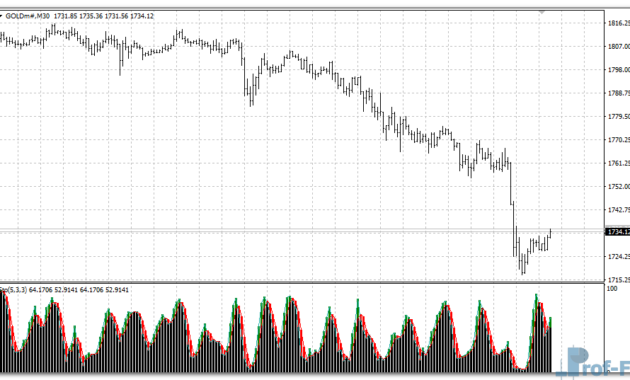
This version calculates two histograms—one for bullish momentum and one for bearish momentum—visually displayed in blue and red respectively. By analyzing the shifts between these two zones, traders can anticipate potential turning points in price action and plan their trades accordingly.
If you are looking for a cleaner and more stable version of Williams Percent Range, the WPR Slow Indicator is one of the best custom indicators for MT4 to include in your trading toolkit.
See also: WSO & WRF MTF
How It Works – WPR Slow Indicator
At its core, the WPR Slow Indicator measures price momentum by comparing the most recent closing price to the price range over a specified period (the “P” parameter). The difference from the standard WPR lies in how this indicator processes and visualizes that data.
Here’s how it works step by step:
- Williams Percent Range Foundation
The indicator starts by calculating the WPR values using the built-in MT4 function iWPR. These values oscillate between 0 and -100, where levels near -20 typically indicate overbought conditions, and levels near -80 indicate oversold conditions. - Squaring and Smoothing the WPR
To create a smoother and slower response, the WPR Slow Indicator squares the original WPR values and adjusts them through internal thresholds. This step reduces market noise and prevents premature signals, allowing traders to see broader momentum shifts rather than small fluctuations. - Dual Histogram Display
- Blue Histogram (Up): Represents upward momentum or potential bullish strength.
- Red Histogram (Down): Represents downward momentum or bearish pressure.
- The indicator paints blue bars when the market shows strong upward bias and red bars when downward conditions dominate. This dual-color display makes it visually easy to see whether the market is entering a buying or selling phase.
- Threshold Levels (n1 and n2 Parameters)
The two numeric thresholds (n1 and n2) act as sensitivity filters.- When momentum is weak (below n1), the indicator shows no strong trend.
- When momentum exceeds n2, it marks the start of a potential strong directional move.
This filtering mechanism helps eliminate false signals that would otherwise confuse traders during sideways markets.
- Momentum Interpretation
- Rising blue bars: Indicate strengthening bullish sentiment.
- Expanding red bars: Signal growing bearish momentum.
- Alternating colors or small values: Suggest indecision or consolidation, meaning traders should wait for clearer confirmation.
By visualizing momentum this way, the WPR Slow Indicator transforms traditional overbought/oversold analysis into a more dynamic interpretation of trend strength and transition.
WPR Slow Indicator Settings
The WPR Slow Indicator offers a few simple but powerful input settings that allow traders to tailor its behavior to their preferred style and timeframe.
| Setting | Description |
| P (Period) | The number of bars used to calculate the Williams Percent Range. Higher values produce smoother, slower signals; lower values make it more responsive. Default: 54. |
| n1 (Lower Threshold) | Defines the minimum value to detect weak momentum. Used to filter out small, insignificant movements. Default: 9. |
| n2 (Upper Threshold) | Sets the cutoff for strong momentum detection. When exceeded, the histogram shows red for bearish or blue for bullish. Default: 49. |
| CountBars | Controls how many candles are processed and displayed on the chart. Default: 300. |
These parameters make the indicator flexible for different market conditions and trading approaches.
For instance:
- Scalpers can reduce the period (P) to 20–30 for faster signals.
- Swing traders may keep the default or raise it to 70+ for smoother, long-term trends.
The visual simplicity—two color-coded histograms—makes the indicator easy to read even on smaller screens. It can also be combined with moving averages or trendlines for confirmation.
Practical Applications in Forex Trading
The WPR Slow Indicator can be applied in several useful ways to improve your trading analysis:
- Trend Confirmation
When the blue histogram remains dominant for several bars, it confirms bullish conditions. Conversely, extended red histograms confirm bearish strength. This helps traders filter trades in the direction of the prevailing trend. - Reversal Detection
When color changes from red to blue or vice versa, it often marks a potential reversal zone. These transitions can act as early warnings of changing market sentiment. - Momentum Divergence
By observing the height of histogram bars versus price action, traders can spot divergences—situations where price makes a new high or low, but momentum does not. Divergences often precede reversals, providing excellent entry or exit opportunities. - Overbought and Oversold Conditions
Although the indicator doesn’t show explicit -20/-80 lines like the standard WPR, extreme histogram readings still suggest overextension, meaning the market may soon correct.
These use cases make the WPR Slow Indicator a valuable addition for traders who rely on technical indicators for forex strategies and want to focus on momentum-based decision-making.
Advantages of Using the WPR Slow Indicator
- Smooth and Reliable Signals
Its slower reaction filters out market noise and avoids false reversals that are common with faster oscillators. - Clear Visuals
The color-coded histogram helps you instantly identify whether bulls or bears are in control. - Beginner-Friendly
Even traders new to momentum indicators can easily understand how to interpret its signals, making it one of the most practical free forex indicators for beginners. - Compatible with All Timeframes
Works efficiently from M1 to D1 charts, adapting its smoothing behavior automatically to market volatility. - Supports Strategic Development
Useful for traders learning how to use indicators in forex trading, as it demonstrates the relationship between price, momentum, and signal confirmation.
Best Practices for Trading with WPR Slow
To get the most value out of the WPR Slow Indicator:
- Combine it with a moving average to confirm the broader trend direction.
- Wait for histogram color changes at key support/resistance levels.
- Avoid trading during low-volume sessions, when momentum signals are less reliable.
- Backtest on your favorite currency pairs before applying in live trading.
- Practice sound risk management—never rely on any indicator without a stop loss.
By integrating these practices, traders can better manage risk and improve accuracy when using momentum-based systems.
How to Instal “WPR Slow” Indicator for Metatrader 4
- Open your Metatrader 4 platform.
- Download and save the “WPR Slow” indicator to your desktop or any other folder located on your local computer.
- Choose “File” then “Open Data Folder” (Ctrl + Shift + D) on your Metatrader 4 platform.
- Explore the following folder: MQL4 > Indicators.
- Copy and paste the “WPR Slow” indicator into this folder.
- Restart Metatrader 4.
- “WPR Slow” indicators are stored by default in the custom indicator folder.
- To access these indicators, go to Top Menu > Insert > Indicators > Custom.
- In order to add a “WPR Slow” indicator to any of your Metatrader 4 charts, you will need to select a forex chart with one mouse click, then go to Top Menu > Insert > Indicators > Custom > click the “WPR Slow”.
- Done!
See a complete guide How To Install Metatrader 4 Custom Indicators
Final Thoughts
The WPR Slow Indicator for MT4 offers a fresh, smoother way to analyze market momentum and identify potential reversal points. By refining the traditional Williams Percent Range formula, it provides more stable, trustworthy signals that can improve decision-making for both new and experienced traders.
Whether you use it for trend confirmation, divergence detection, or as part of a broader strategy, this indicator delivers clarity and precision without overcomplicating your charts.
If you’re seeking a dependable momentum oscillator that balances responsiveness with stability, the WPR Slow Indicator deserves a place in your trading toolkit.
You can try this tool directly by downloading it below.
Free Download WPR Slow indicator for Metatrader 4
- wpr-slow.zip
- Size: 17.6 kb
- Platform: MT4 | Format: .mql4/.ex4 | File: dir9mt4 | Request Remove!