|
 |
 |
 |
See also: Universal Pivot MT4 Indicator
Quantile Bands Indicator for MT4 – Multi-Timeframe Quantile-Based Volatility Channel
Overview
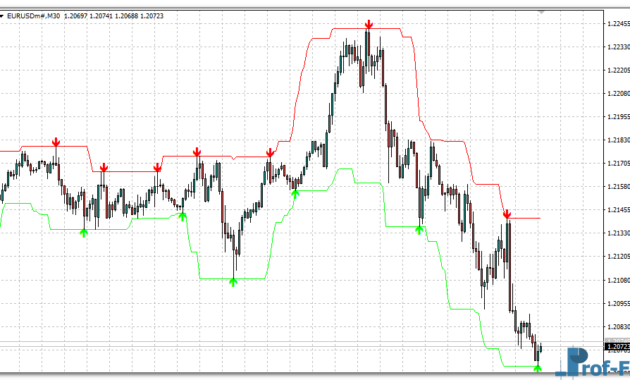
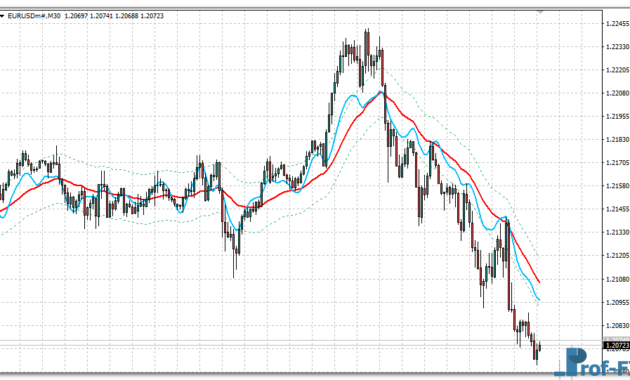
The Quantile Bands Indicator for MT4 is a powerful volatility-based channel that adapts to changing market conditions by using statistical quantiles instead of fixed standard deviations. Unlike Bollinger Bands, which rely on standard deviation to measure price dispersion, Quantile Bands dynamically adjust upper and lower limits based on price distribution percentiles — offering a more flexible and data-driven approach to identifying overbought and oversold zones.
This indicator can operate in multi-timeframe (MTF) mode, allowing traders to visualize the quantile structure of higher timeframes directly within their current chart. The result is a smoother, more context-aware volatility channel that highlights where price is statistically likely to revert or break out.
Key Features
- Quantile-Based Volatility Channel – Uses price percentiles (e.g., 90th, 50th, and 10th) instead of standard deviation, adapting to real market distributions.
- Multi-Timeframe Mode (MTF) – View quantile structures from higher periods (H1, H4, D1, etc.) within your current chart.
- Customizable Price Types – Choose from multiple price bases such as Close, High, Low, Median, Typical, Weighted, and Heiken-Ashi derived prices.
- Highly Configurable Parameters – Adjust period length, upper/lower quantile percentages, median percentile, and interpolation smoothing.
- Color-Coded Trend Visualization – Green and brown bands display uptrend or downtrend zones visually for quick recognition.
- Trend Filtering Logic – Embedded logic tracks short-term directional shifts using quantile slope comparisons.
How It Works
The Quantile Bands indicator calculates three main statistical levels within a user-defined period:
- Upper Band – Represents the Upper Quantile (e.g., 90th percentile) of the selected price series.
- Median Band – Represents the Median Quantile (e.g., 50th percentile), showing the central tendency of price movement.
- Lower Band – Represents the Lower Quantile (e.g., 10th percentile), indicating statistically undervalued zones.
When price touches or exceeds the Upper Band, the market is trading near its short-term extreme — often signaling potential exhaustion or breakout continuation.
When price drops to the Lower Band, it reflects a statistically low price relative to the chosen period — commonly preceding a rebound or accumulation phase.
The indicator’s MTF engine allows the user to analyze higher-timeframe quantile positions without leaving the current chart, which helps align short-term entries with long-term distribution boundaries.
Trading Applications
- Reversal Identification:
Detect mean-reversion opportunities when price reaches the upper or lower quantiles, especially when accompanied by slowing momentum. - Trend Continuation Signals:
Use the slope of the upper or lower bands to determine whether volatility expansion supports the prevailing trend. - Multi-Timeframe Confluence:
Combine quantile zones from higher timeframes (like H4 or D1) with intraday structures (M15, M30) to filter low-probability trades. - Dynamic Support & Resistance:
Quantile boundaries act as adaptive zones of supply and demand, updating continuously as new data enters the distribution window.
Parameters
| Parameter | Description |
| TimeFrame | Selects which timeframe’s quantiles to display (MTF mode). |
| Periods | Number of bars used for quantile calculations. |
| PriceM / PriceH / PriceL | Defines which price types (Median, High, Low) are used in quantile computation. |
| UpperBandPercent / LowerBandPercent / MedianBandPercent | Defines percentile thresholds for top, bottom, and median bands. |
| Interpolate | Smooths transitions between MTF values for cleaner visual output. |
Advantages of Quantile Bands
- Statistically adaptive and robust to outliers.
- Reflects real market price distribution, not just volatility magnitude.
- Can be used across all timeframes and trading styles (scalping to swing trading).
- Integrates smoothly with Heiken-Ashi, Trend filters, and MTF dashboards.
How to Instal “Quantile Bands” Indicator for Metatrader 4
- Open your Metatrader 4 platform.
- Download and save the “Quantile Bands” indicator to your desktop or any other folder located on your local computer.
- Choose “File” then “Open Data Folder” (Ctrl + Shift + D) on your Metatrader 4 platform.
- Explore the following folder: MQL4 > Indicators.
- Copy and paste the “Quantile Bands” indicator into this folder.
- Restart Metatrader 4.
- “Quantile Bands” indicators are stored by default in the custom indicator folder.
- To access these indicators, go to Top Menu > Insert > Indicators > Custom.
- In order to add a “Quantile Bands” indicator to any of your Metatrader 4 charts, you will need to select a forex chart with one mouse click, then go to Top Menu > Insert > Indicators > Custom > click the “Quantile Bands”.
- Done!
See a complete guide How To Install Metatrader 4 Custom Indicators
Conclusion
The Quantile Bands Indicator for MT4 provides traders with a statistically grounded alternative to traditional volatility channels. By measuring price percentiles instead of deviation, it adapts more effectively to market dynamics and highlights zones where probability favors either mean reversion or trend continuation.
Whether you’re a data-driven trader or simply looking for a more stable band system than Bollinger or Keltner channels, Quantile Bands can enhance your market insight and precision.
Download Quantile Bands Indicator for MT4
You can download the latest version of the Quantile Bands Indicator for MetaTrader 4 for free below:
Free Download Quantile Bands indicator for Metatrader 4
- quantile-bands.zip
- Size: 25.5 kb
- Platform: MT4 | Format: .mql4/.ex4 | File: dir9mt4 | Request Remove!