|
 |
 |
 |
What Is the BH CCI Alerts TT Indicator
The BH CCI Alerts TT [x3] indicator is a custom MT4 tool that turns the Commodity Channel Index (CCI) into a clear, actionable signal framework on the main chart window. Instead of asking you to watch a separate oscillator panel, the indicator marks price swings directly on the chart with colored rectangles and optional trend lines. It tracks when CCI pushes into extreme zones and then alerts you when momentum exits those extremes, so you can react to potential reversals or pullbacks in real time.
This indicator uses CCI with a configurable period (default 45) and a HotLevel threshold (default ±100). When CCI rises above +HotLevel, the tool identifies a “hot” bullish stretch; when CCI falls below −HotLevel, it spotlights a “hot” bearish stretch. The indicator then draws boxes over those stretches on the price chart, helping you see where momentum ran hot and where price carved notable swing highs or swing lows. Because these areas often act as reaction zones after momentum cools, the visual markup makes context obvious at a glance.
Traders who prefer chart-centric decision making gain an immediate edge: the BH CCI Alerts TT indicator moves the heavy lifting from a subwindow to the candles you trade. If you are searching for a reliable free forex indicator download to systematize momentum extremes, this tool offers practical clarity and fast visual feedback without cluttering your workstation.
How It Works BH CCI Alerts TT Indicator
The BH CCI Alerts TT indicator builds all signals around the CCI’s relationship to your chosen threshold:
- Identify extreme momentum
The indicator checks each bar for a CCI reading above +HotLevel or below −HotLevel. These runs define periods of stretched momentum. During a bullish run, buyers drive price aggressively; during a bearish run, sellers dominate. The tool captures each continuous run so you can study how price behaved while momentum stayed extreme. - Draw price rectangles for context
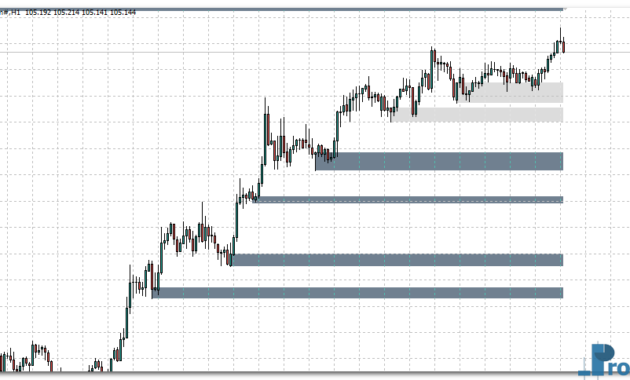
For every detected run, the indicator draws a colored rectangle on the main chart that neatly wraps the price action during that stretch. A red-tinted box marks a bullish CCI run (price often forms a swing high inside it), while a blue-tinted box marks a bearish CCI run (price often forms a swing low inside it). The tool adds a small dynamic cushion based on Average True Range (ATR), so the boxes breathe with volatility and do not cut through wick tips. These “heat zones” make it easy to see where momentum overextended. - Mark swing extremes and optional rays
Inside each run, the indicator tracks the highest high during a bullish stretch or the lowest low during a bearish stretch. If you enable ShowLines, the tool can draw trend rays between successive extremes to project structure forward. You can choose to extend those rays to the right for quick support/resistance projection and limit ray creation to recent history so older lines do not clutter the chart. - Alert on momentum exit, not only entry
The indicator focuses on transitions. It sends a SELL-slanted alert when CCI drops back below +HotLevel (momentum exits a bullish extreme) and a BUY-slanted alert when CCI climbs back above −HotLevel (momentum exits a bearish extreme). This behavior targets the moment when an overstretched move reverts or cools, which many traders use for pullback entries, mean-reversion scalps, or trailing-stop decisions. - Operate on your chart timeframe
The tool runs on the chart’s current timeframe and displays everything in the price window, so you interpret signals in direct relation to candles, wicks, and your existing levels. You do not need to glance back and forth between a subwindow and the chart.
Because the BH CCI Alerts TT indicator aligns visual zones, swing extremes, and exit alerts, it fits seamlessly into bulls-and-bears trading strategy workflows. Trend followers can use exit alerts as early warnings for momentum fatigue; mean-reversion traders can watch the first clean exit from an extreme as a potential counter-move setup; breakout traders can note where rectangles cluster to spot pressure builds around prior extremes.
BH CCI Alerts TT Indicator Settings
You can tailor the indicator to your market and style. Here are the key inputs and how they affect behavior:
- BarsToCheck
Defines how many historical bars the indicator scans to build rectangles and lines. Higher values give more historical context; lower values keep the chart light. - CCIPeriod (default 45)
Sets the sensitivity of the CCI engine. A shorter period reacts faster but can produce more signals; a longer period smooths noise and isolates stronger momentum stretches. - CCIPrice (default Typical Price)
Selects the applied price (Close, Open, High, Low, Median, Typical, Weighted). Typical Price often balances noise and relevance for CCI-based momentum reads. - HotLevel (default 100)
Defines the extreme zone threshold. Raising this value reduces the number of extreme stretches (fewer but stronger signals). Lowering it increases sensitivity and highlights more runs. - Rectangle1 / Rectangle2 (colors)
Control the box colors for bullish and bearish stretches. Use high-contrast tones to read zones quickly on your template. - ShowLines (true/false)
Enables the drawing of trend rays between successive extremes so you can project potential support/resistance and visualize structure across runs. - RayRight (true/false)
Extends rays to the right so projected levels carry forward into future bars. This helps you see where a reaction might occur as price returns to prior extremes. - HowH1forRay
Limits ray creation to ranges aligned with recent H1-equivalent history (e.g., last 96 H1 bars), preventing older lines from cluttering the chart. - RayStyle
Sets the visual style for rays (e.g., dotted). Choose a style that complements your chart theme. - AlertBar
Tells the indicator which bar to evaluate for alert logic (common choices are the just-closed bar or the bar before it to avoid intra-bar noise). - AlertsMessage / AlertsSound / AlertsEmail / AlertsMobile / SoundFile
Configure how you receive alerts when CCI exits an extreme zone. Pop-ups suit desk trading; mobile push and email keep you informed when away. You can assign a preferred sound file for audible cues.
These options give you granular control. Scalpers can lower CCIPeriod and HotLevel to surface more frequent setups on M1–M5. Swing traders can increase CCIPeriod and keep HotLevel at 100 or higher on H4–D1 to target only major momentum stretches. If you want a clean chart, keep ShowLines off and rely solely on rectangles and alerts; if you want structural guidance, turn lines on and RayRight to true.
Why Use the BH CCI Alerts TT Indicator in Forex Trading
The forex market oscillates between expansion and contraction. The BH CCI Alerts TT indicator codifies those expansions by spotlighting when momentum becomes extreme and then flags the moment it cools. This design supports several use cases:
- Momentum exit timing
The alert on exit from +HotLevel or −HotLevel helps you time pullbacks, partial profit decisions, or first contrarian probes after a stretch move. - Price-first clarity
Because the tool draws in the main chart window, you interpret signals where you place orders and stops. Rectangles anchor your attention to real swing zones, not abstract oscillator values. - Structure projection
Optional rays connect successive extremes to sketch evolving resistance and support. As price retests those projections, you get context for reaction trades or continuation filters. - Workflow versatility
Trend traders use the boxes to trail stops below the most recent bearish rectangle (in an uptrend) or above the most recent bullish rectangle (in a downtrend). Range traders use consecutive alternating boxes to identify fade zones. Breakout traders watch for narrow clusters of rectangles that often precede expansion. - Alert flexibility
Messages, sounds, email, and mobile push make the tool set-and-forget friendly. You can monitor several pairs and still catch pivotal transitions.
If you want a forex custom indicator that streamlines momentum analysis and keeps your eyes on price, BH CCI Alerts TT offers a practical, no-nonsense edge.
Download BH CCI Alerts TT Indicator for MT4
The BH CCI Alerts TT indicator MT4 download is available free on this page. Install it into your MetaTrader 4 Indicators folder, refresh your Navigator, and attach it to any chart. The rectangles will mark hot momentum zones, optional rays will project structure, and the alert engine will notify you when momentum exits extremes.
Use it on your preferred timeframe, combine it with basic price action, and let the alerts handle the heavy monitoring while you focus on execution quality.
Click the button below to download the BH CCI Alerts TT indicator for MT4 and start trading with clearer momentum context today.
Free Download BH CCI Alerts mt4 indicator for Metatrader 4
- BH-CCI-Alerts.zip
- Size: 20.4 kb
- Platform: MT4 | Format: .mql4/.ex4 | File: dir1mt4 | Request Remove!
How to Instal “BH CCI Alerts mt4” Indicator for Metatrader 4
- Open your Metatrader 4 platform.
- Download and save the “BH CCI Alerts mt4” indicator to your desktop or any other folder located on your local computer.
- Choose “File” then “Open Data Folder” (Ctrl + Shift + D) on your Metatrader 4 platform.
- Explore the following folder: MQL4 > Indicators.
- Copy and paste the “BH CCI Alerts mt4” indicator into this folder.
- Restart Metatrader 4.
- “BH CCI Alerts mt4” indicators are stored by default in the custom indicator folder.
- To access these indicators, go to Top Menu > Insert > Indicators > Custom.
- In order to add a “BH CCI Alerts mt4” indicator to any of your Metatrader 4 charts, you will need to select a forex chart with one mouse click, then go to Top Menu > Insert > Indicators > Custom > click the “BH CCI Alerts mt4”.
- Done!
See a complete guide How To Install Metatrader 4 Custom Indicators